Best Dictation Apps for Mac in 2026: 11 Tools Tested and Ranked
Quick answer
I researched 11 dictation apps for Mac, comparing them on accuracy, AI clean-up, offline support, and price. 5 of the 11 work without internet, 6 offer AI text clean-up, and prices range from free to $139/year. Shepit, Superwhisper, and Apple Dictation came out on top for different use cases. Details below.
If you dictate on a Mac - emails, notes, documents, anything longer than a quick message - you have probably hit the same wall. The built-in dictation gets the words down, but the editing afterwards takes almost as long as typing would have. No filler word removal, no grammar fixes, no way to teach it your terminology.
I ran into this while researching dictation tools for Shepit's product needs. I ended up comparing 11 apps that handle dictation on macOS in 2026 - from the free built-in option to subscriptions at $14.99/month - and evaluating each on what matters when you dictate daily: accuracy, AI clean-up, offline support, speed, and price.
This article is what came out of that research. Every evaluation is based on vendor documentation, user reviews, and hands-on testing, not fabricated benchmarks.
The best app depends on what you dictate
- Best for daily dictation with AI clean-up: Shepit - from $4.99/mo
- Best free option: Apple Dictation - built in, on-device, zero setup
- Best for developers: Superwhisper - custom AI modes, on-device Whisper, from $10/mo
- Best for meetings: Otter.ai - real-time transcription, speaker labels, from $16.99/mo
- Best one-time purchase: VoiceInk - on-device Whisper, AI enhancement, ~$10
The reasoning is below, along with the six apps that did not make this shortlist and why.
How I evaluated these apps
I installed every app that runs natively on macOS and dictated the same content types: emails, Slack messages, technical notes, and long-form writing. Browser-only apps were tested in Chrome on the same Mac.
Five criteria:
- Accuracy - how well the app handles natural speech, technical terms, and mixed-language input. Based on vendor documentation and user reviews, not synthetic benchmarks.
- AI clean-up - whether the app removes filler words, fixes grammar, and formats output beyond raw transcription.
- Offline support - whether dictation works without internet.
- Speed - how quickly text appears after speaking.
- Price - monthly cost, annual discounts, and what the free tier covers.
I did not run controlled word-error-rate tests. Those require a standardized corpus and controlled conditions. This is a product comparison, not a benchmark paper.
The 11 apps, side by side
The table covers offline support, AI clean-up, system-wide dictation, and starting price. Details for each app follow in the next section.
All 11 apps compared on the features that matter for daily Mac dictation.
Prices as of October 2026. System-wide means dictation into any Mac app, not just the app's own interface.
| App | Works offline | AI clean-up | System-wide | Starting price | Best for |
|---|---|---|---|---|---|
| Shepit | No | Yes | Yes | Free / from $4.99/mo | All-day dictation |
| Superwhisper | Yes | Yes | Yes | From $10/mo | Developers |
| Apple Dictation | Yes | No | Yes | Free | Quick notes |
| Wispr Flow | No | Yes | Yes | From $10/mo | Emails and messages |
| VoiceInk | Yes | Needs API key | Yes | ~$10 one-time | Budget dictation |
| Aqua Voice | No | Yes | Yes | $9/mo | Context-aware dictation |
| MacWhisper | Yes | No | No | $15 one-time | Audio transcription |
| Otter.ai | No | Meetings only | No | Free / from $16.99/mo | Meeting transcription |
| Spokenly | Yes | No | Yes | ~$20 one-time | Simple, private dictation |
| Dragon Professional | No | Yes | No | From $15/mo | Enterprise, Windows |
| Speechify | No | No | No | $139/year | Chrome only |
Prices as of October 2026. Vary by country and tax.
Each app, reviewed
Shepit
Full disclosure: I am Shepit's product manager.
Shepit works in any Mac text field. Press a hotkey, speak, and text appears at your cursor. Turn on AI cleanup in settings and the app removes filler words, fixes punctuation, and polishes rough speech into clean sentences.
What it does well. AI clean-up is the standout feature. Turn it on and speak naturally - half-finished thoughts included - and get readable text. Without cleanup, you still get punctuated transcription from the speech engine. Supports ~100 languages, switches between them without settings changes, and works in any Mac app through system-level text insertion.
Where it falls short. Cloud-only. No on-device mode yet, so if your internet drops, dictation stops. The free tier caps at 30 minutes per month. AI cleanup is off by default - you need to turn it on in settings.
Accuracy. Whisper engine family. We test internally but have not published WER numbers from a controlled comparison.
Pricing. Free: 30 min/month. Basic: from $4.99/month, 10 hours. Pro: from $14.99/month, unlimited. Prices vary by country and tax.
Best for: people who dictate throughout the day and want clean text without editing.
Apple Dictation
Already on your Mac. No download, no account, no payment. Press Fn twice, speak, text appears. On Apple Silicon, processing stays on-device.
What it does well. Free, private, fast. Audio never leaves the Mac on Apple Silicon. Basic punctuation commands ("period," "new line"), 60+ languages. Since macOS Ventura, no time limit on continuous dictation.
Where it falls short. No AI clean-up - what you say is what you get, filler words included. Technical terms are unreliable unless added to text replacements manually. No formatting beyond basic commands, no export, no history.
Accuracy. Apple does not publish WER numbers. Handles clear English well, struggles with domain-specific vocabulary and noisy environments.
Pricing. Free with macOS.
Best for: quick notes and messages when you do not want to install anything.
Superwhisper
Runs Whisper models locally on your Mac. Multiple AI modes transform dictation through custom prompts.
What it does well. The AI modes stand out. Define custom prompts that format speech as code comments, email replies, or documentation. Fully on-device with local Whisper models - no cloud, no audio leaving your machine. Switch between plain transcription and AI-enhanced output per mode.
Where it falls short. Steep learning curve. Configuring AI modes and choosing the right model takes time. On-device models are slower than cloud, especially on older Macs. Battery drain on long sessions with large models.
Accuracy. Depends on the Whisper model size. Large is accurate but slow; small is fast but weaker on accented speech and technical terms.
Pricing. Personal: $10/month or $99/year. Professional: $15/month or $149/year.
Best for: developers and power users who want control over how speech becomes text.
Wispr Flow
Wispr does not transcribe word-for-word. It reads your screen context - the email you reply to, the Slack thread - and writes in your style.
What it does well. Context awareness. Reply to a formal email and Wispr writes formally. Chat in Slack and it writes casually. The output sounds typed, not dictated.
Where it falls short. Cloud-only. Every word and screen context goes to Wispr's servers - a dealbreaker for sensitive data. No offline mode.
Accuracy. Aims for intent accuracy, not transcription accuracy, which makes traditional metrics hard to apply. Users report it handles natural speech well but sometimes over-edits, changing meaning.
Pricing. $10/month or $99/year.
Best for: professionals who dictate emails and messages and want output that matches their writing style.
MacWhisper
A transcription app first, dictation tool second. Built on Whisper, runs on-device.
What it does well. Batch transcription. Drop an audio file or podcast and get transcripts with timestamps. Generates subtitles (SRT, VTT), handles any file length. One-time purchase in a market of subscriptions.
Where it falls short. Live dictation is weak. No system-wide hotkey, no AI clean-up for live speech, no way to dictate into other apps.
Accuracy. Full Whisper model range. Large-v3 is accurate for clear recordings. Live accuracy is lower because it processes in chunks.
Pricing. One-time. Basic: $15. Pro: $35. Premium: $75.
Best for: transcribing recorded audio, not live dictation.
VoiceInk
Lightweight Mac dictation with on-device Whisper and AI enhancement.
What it does well. Value. One-time purchase with on-device transcription and customizable AI Actions - predefined transformations like "make this an email" or "summarize." Multiple languages, custom vocabulary.
Where it falls short. AI enhancement requires a separate OpenAI API key, adding ongoing cost. Slower on pre-M-series Macs. Less polished than Superwhisper or Shepit.
Accuracy. On-device Whisper. Depends on model size and hardware. Strong on clear speech, weaker on technical jargon.
Pricing. ~$10 one-time. AI features need a separate API key.
Best for: budget-conscious users who want on-device dictation without a subscription.
Otter.ai
A meeting transcription platform with a dictation side feature. Mac access is web-based.
What it does well. Meeting transcription: speaker identification, real-time collaboration, searchable archives. Joins Zoom, Meet, or Teams calls. Generates action items and summaries.
Where it falls short. Not a dictation app. No system-wide hotkey, no dictating into other text fields - you work inside Otter's interface. Cloud-only. Free tier: 300 min/month, 30 min per conversation.
Accuracy. Optimized for conversational speech and meetings. Handles multiple speakers well. Less accurate on solo dictation with technical content.
Pricing. Free: 300 min/month. Pro: $16.99/month. Business: $30/month per user.
Best for: teams that need meeting transcription, not individuals dictating into apps.
Dragon Professional
The dictation standard for two decades. Nuance (now Microsoft) killed the Mac version in 2018, the Windows desktop version in 2024. What remains: Dragon Professional Anywhere, a cloud service for enterprises.
What it does well. Voice commands, custom vocabularies, and formatting controls that still outclass every other app - on Windows.
Where it falls short. No native Mac app. Browser-based, often needs a Windows environment. Enterprise pricing. For individual Mac users, Dragon is gone.
Accuracy. Historically the best for English dictation. The cloud version keeps that reputation, but no macOS-native comparison is possible.
Pricing. $15-49/month depending on plan.
Best for: enterprises on Windows with existing Dragon workflows. Not realistic for Mac in 2026.
Speechify Voice Typing
Speechify is a text-to-speech company. Voice typing is a Chrome extension.
What it does well. If you already pay for Speechify, it adds dictation in Chrome text fields.
Where it falls short. Chrome-only. No native Mac apps. Basic features. Voice typing is not the core product.
Accuracy. Cloud-based. Adequate for simple dictation, behind dedicated apps on technical content.
Pricing. Part of Speechify Premium: $139/year.
Best for: existing Speechify users who want basic voice typing in Chrome.
Aqua Voice
AI-native dictation built around language models from the start.
What it does well. Context awareness: reads the app you are in and adapts output. Shorter messages in Slack, longer paragraphs in a doc editor. Natural language editing commands ("delete the last sentence"). Clean, minimal interface.
Where it falls short. Cloud-only. Relatively new - fewer integrations, smaller user community. No offline mode.
Accuracy. Cloud models. Strong on English, limited language support compared to Whisper-based apps.
Pricing. $9/month.
Best for: Mac users who want context-aware dictation and accept cloud processing.
Spokenly
Simple Mac dictation on Whisper. On-device, minimal.
What it does well. Does one thing. Hotkey, speak, text. No cloud, no audio leaving your Mac. One-time purchase.
Where it falls short. No AI clean-up, no prompts, no context awareness. Small team, limited updates.
Accuracy. On-device Whisper. Good on clear speech, weaker on accented or technical content.
Pricing. ~$20 one-time.
Best for: users who want simple, private dictation with no complexity.
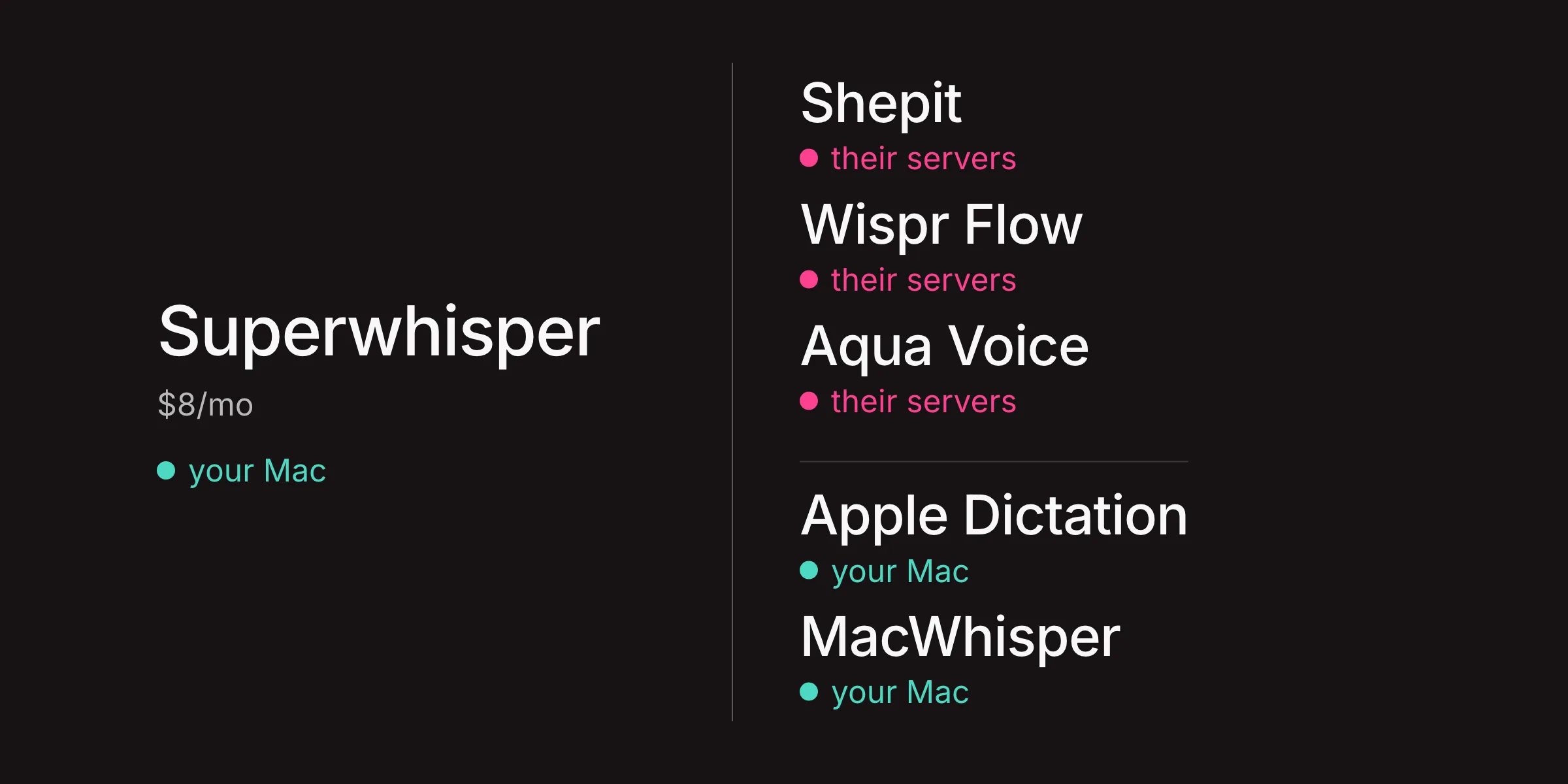
Five apps work offline, six do not
This matters if you dictate from cafes, planes, or anywhere with unreliable internet.
Fully offline: Apple Dictation (Apple Silicon), Superwhisper (local mode), MacWhisper, VoiceInk, Spokenly. All run speech models on your Mac. The trade-off: slower processing, higher battery drain, no cloud-level AI clean-up.
Cloud-only: Shepit, Wispr Flow, Otter.ai, Aqua Voice, Speechify. Audio goes to a server and comes back as text. Faster and more accurate on complex input, but dead without internet.
Hybrid: Superwhisper is the only app offering both on-device and cloud modes in one tool.
If offline is a hard requirement, your realistic options are Apple Dictation (free), VoiceInk (~$10 one-time), or Superwhisper (from $10/month with local Whisper).
Apple Dictation handles the basics
For many people, it is enough. Short messages, quick notes, the occasional paragraph - Apple Dictation does that without extra software, cost, or data leaving the Mac.
It stops being enough when you:
- Dictate more than a few minutes at a time and spend as long editing as speaking
- Use technical vocabulary Apple does not recognize
- Need filler words removed and grammar fixed automatically
- Switch between languages mid-sentence
- Want searchable history of what you dictated
The gap between Apple Dictation and a dedicated app shows in editing time. Apple gives you raw speech. A dedicated app gives you text you can send.
Three questions that narrow the field
How much do you dictate? Under 10 minutes a day, Apple Dictation is fine. Over that, the editing time saved by AI clean-up pays for a dedicated app within a week.
Does your audio need to stay on your Mac? If yes: Apple Dictation, Superwhisper (local mode), VoiceInk, MacWhisper, or Spokenly. All on-device.
What do you dictate? Emails and messages: Wispr Flow or Shepit. Technical content and code: Superwhisper. Meeting transcripts: Otter.ai. Recorded audio files: MacWhisper.
Price is the last filter, not the first. The cheapest option that does not save editing time costs more than the pricier one that does.
The verdict
No single app wins every column. The best dictation app for Mac depends on what you dictate, how much privacy you need, and whether a subscription is acceptable.
For someone who dictates daily, three finalists:
- Shepit for AI clean-up that works in any Mac app. Turn it on and it removes the editing step that eats half the time you saved by dictating. From $4.99/month.
- Superwhisper for full control and on-device processing. Custom AI modes, local Whisper, no cloud dependency. From $10/month.
- Apple Dictation when free and private is all you need. Already on your Mac, covers the basics for short notes.
If you are coming from Dragon, there is no direct replacement on macOS. Superwhisper comes closest in customization. Shepit comes closest in daily convenience.
Questions about Mac dictation apps
What is the most accurate dictation app for Mac?
There is no reliable public benchmark comparing all Mac dictation apps. Accuracy depends on your voice, accent, vocabulary, and environment. Apps using OpenAI Whisper (Superwhisper, Shepit, MacWhisper, VoiceInk, Spokenly) share the same base engine. Apple Dictation uses Apple's own on-device models. Cloud-based apps tend to handle technical content better because they run larger models.
Is there a free dictation app for Mac?
Apple Dictation is free and built into every Mac - press Fn twice to start. It runs on-device on Apple Silicon and supports 60+ languages. Shepit and Otter.ai also have free tiers: 30 minutes and 300 minutes per month, respectively.
Can I use dictation apps offline on Mac?
Five of the 11 apps in this comparison work offline: Apple Dictation (Apple Silicon), Superwhisper (local mode), MacWhisper, VoiceInk, and Spokenly. All use on-device speech models. The trade-off is slower processing and higher battery drain compared to cloud alternatives.
What happened to Dragon for Mac?
Nuance discontinued Dragon Professional Individual for Mac in 2018. The Windows desktop version followed in 2024. The remaining product, Dragon Professional Anywhere, is a cloud service for enterprises and does not run natively on macOS.
Which dictation app has the best AI clean-up?
Wispr Flow and Shepit both offer AI processing that rewrites speech into clean text. Wispr adds context awareness - it reads your screen and adapts output. Shepit's optional AI cleanup polishes rough speech, fixes punctuation, and smooths out self-corrections across ~100 languages. Superwhisper offers customizable AI modes where you define exactly how speech is transformed.
Are dictation apps safe to use with sensitive data?
On-device apps (Apple Dictation, Superwhisper in local mode, VoiceInk, MacWhisper, Spokenly) process audio on your Mac - voice data never leaves the machine. Cloud-based apps (Shepit, Wispr Flow, Otter.ai, Aqua Voice) send audio to remote servers. Check each app's privacy policy for data retention and usage terms before dictating anything confidential.
How do I set up dictation on a Mac?
For Apple Dictation: open System Settings, go to Keyboard, and turn on Dictation. For third-party apps: download from the developer's website or the Mac App Store, grant microphone access when prompted, and set your preferred hotkey. Most apps take under two minutes to configure.